# VM backups


**Development preview.** This feature is in preview. Please
send feedback to support@exe.dev.

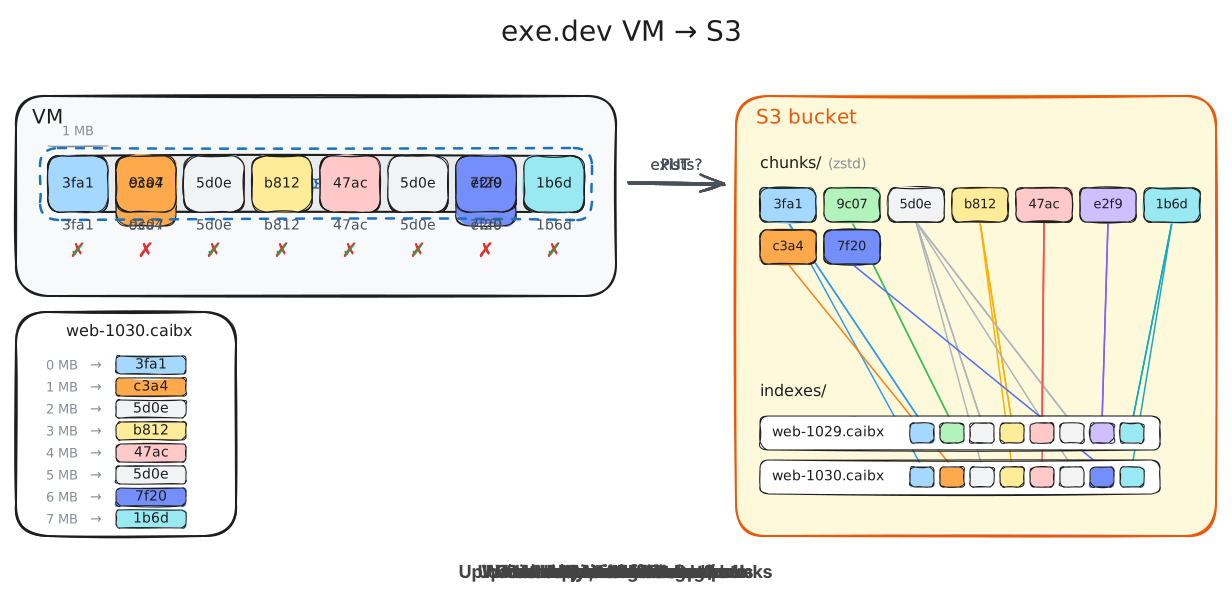
`backup` copies a VM's disk to an S3 bucket configured via a Workload Identity
Federation integration. Backups are
[desync](https://github.com/folbricht/desync) chunk stores, and can be restored
both onto an exe.dev VM as well as independently of exe.

<div class="excalimux-anim">
<img src="https://exe.dev/static-asset/TcM-BtCMXh7b6Ob_SlD5AA/vm-backups-to-s3.svg" alt="Animation: a backup snapshots the VM's disk, cuts it into 1 MB chunks, hashes each chunk, and uploads, compressed, only the chunks the S3 bucket doesn't already have under chunks/. It then writes an index from each disk offset to its chunk under indexes/. When the VM later writes, the next backup hashes the changed chunks and uploads only the missing ones, so backups are incremental." width="1232" height="596"/>
</div>

## Setting up AWS and Exe

The best way to configure this is to point your agent at these docs.

Create an S3 bucket:

```
export AWS_ACCOUNT_ID=123456789012
export BUCKET_NAME=acme-exe-backups
export ROLE_NAME=exe-dev-backups
export AWS_ROLE_ARN="arn:aws:iam::${AWS_ACCOUNT_ID}:role/${ROLE_NAME}"
aws s3 mb "s3://${BUCKET_NAME}" --region us-west-2
```

Be aware that a chunk in this bucket being old does not imply that it is
not part of a backup, so be wary of lifecycle rules that expire objects.

Create a workload identity integration for the role:

```
ssh exe.dev integrations add wif --name=backups --audience=sts.amazonaws.com \
  --consumer=aws --metadata=role_arn="$AWS_ROLE_ARN"
```

Set its `Issuer` and `Subject` in your shell:

```
export EXE_WIF_ISSUER=https://exe.dev/issuer/example
export EXE_WIF_SUBJECT=sub-ABCDEFGHIJKLMNOPQRSTUVWXYZ
export AWS_OIDC_CONDITION_PREFIX="${EXE_WIF_ISSUER#https://}"
export AWS_OIDC_PROVIDER_ARN="arn:aws:iam::${AWS_ACCOUNT_ID}:oidc-provider/${AWS_OIDC_CONDITION_PREFIX}"
```

Add the backup audience to the issuer's IAM OIDC provider:

```
aws iam add-client-id-to-open-id-connect-provider \
  --open-id-connect-provider-arn "$AWS_OIDC_PROVIDER_ARN" --client-id exe.dev/vm-backup
```

If you have no provider for the issuer yet, create it instead:

```
aws iam create-open-id-connect-provider \
  --url "$EXE_WIF_ISSUER" --client-id-list exe.dev/vm-backup
```

Create roles for backups:

```
cat > /tmp/exe-backups-trust.json <<EOF
{
  "Version": "2012-10-17",
  "Statement": [
    {
      "Effect": "Allow",
      "Principal": {"Federated": "${AWS_OIDC_PROVIDER_ARN}"},
      "Action": "sts:AssumeRoleWithWebIdentity",
      "Condition": {
        "StringEquals": {
          "${AWS_OIDC_CONDITION_PREFIX}:aud": "exe.dev/vm-backup",
          "${AWS_OIDC_CONDITION_PREFIX}:sub": "${EXE_WIF_SUBJECT}"
        }
      }
    }
  ]
}
EOF

aws iam create-role --role-name "$ROLE_NAME" --max-session-duration 43200 \
  --assume-role-policy-document file:///tmp/exe-backups-trust.json
```

Grant it the bucket:

```
cat > /tmp/exe-backups-policy.json <<EOF
{
  "Version": "2012-10-17",
  "Statement": [
    {
      "Effect": "Allow",
      "Action": "s3:ListBucket",
      "Resource": "arn:aws:s3:::${BUCKET_NAME}",
      "Condition": {
        "StringLike": {
          "s3:prefix": [
            "chunks/*",
            "indexes/*"
          ]
        }
      }
    },
    {
      "Effect": "Allow",
      "Action": "s3:PutObject",
      "Resource": [
        "arn:aws:s3:::${BUCKET_NAME}/chunks/*",
        "arn:aws:s3:::${BUCKET_NAME}/indexes/*"
      ]
    },
    {
      "Effect": "Allow",
      "Action": "s3:GetObject",
      "Resource": [
        "arn:aws:s3:::${BUCKET_NAME}/chunks/*",
        "arn:aws:s3:::${BUCKET_NAME}/indexes/*"
      ]
    },
    {
      "Effect": "Allow",
      "Action": "s3:DeleteObject",
      "Resource": [
        "arn:aws:s3:::${BUCKET_NAME}/chunks/*",
        "arn:aws:s3:::${BUCKET_NAME}/indexes/*"
      ]
    }
  ]
}
EOF

aws iam put-role-policy --role-name "$ROLE_NAME" --policy-name exe-dev-backups \
  --policy-document file:///tmp/exe-backups-policy.json
```

`backup new` needs only the `ListBucket` on `chunks/*` and the
`PutObject`; `backup restore` only the `GetObject`. To keep backups under a
prefix, pass `--bucket=bucket/prefix` and put the prefix in front of
`chunks/` and `indexes/` in the policy.

## Back up and restore

```
backup new --bucket=acme-exe-backups --integration=backups web
backup list
backup status web-20261008-1910
backup watch web-20261008-1910
backup restore web-20261008-1910 web-restored
```

A backup syncs the VM's filesystem and snapshots its disk. With `--freeze`,
writes in the VM also pause briefly while the snapshot is taken.

## Delete old backups

`backup vacuum` deletes the backups older than `--keep-days` (at least 7),
except each VM's newest, and then the chunks no remaining backup uses. Only
team admins can vacuum with a team's integration.

```
backup vacuum --bucket=acme-exe-backups --integration=backups --keep-days=30
```

## Restore without exe.dev

A backup is a disk image holding one ext4 filesystem, with no partition
table. With AWS credentials that can read the bucket in `S3_ACCESS_KEY`,
`S3_SECRET_KEY` and `S3_SESSION_TOKEN`:

```
export STORE=s3+https://s3.us-west-2.amazonaws.com/${BUCKET_NAME}
desync extract -s "$STORE/chunks/" "$STORE/indexes/web-20261008-1910.caibx" disk.img
sudo mount -o loop,ro,noload disk.img /mnt
```